
The Easiest Prompt For Creating Kids’ Coloring Pages
(Even if You’re New to AI)
If you’ve ever sat staring at a blank screen thinking, “I want to make cute coloring pages… but I have no idea where to start,” you are absolutely not alone.
Most creators want to jump into printables, kids’ activity books, or Etsy products, but the design part feels overwhelming – especially if you’re not “artistic.”
The good news?
Creating adorable kids’ coloring pages is now easier, faster, and more beginner-friendly than ever.
Today, I’m going to show you the easiest possible way to make a kid-safe, cute coloring page using one simple prompt – even if you’ve never used AI art tools before. And yes… it will look like something you actually want to sell or use in your printables.
Let’s dive in.
Why Coloring Pages Are the Perfect Place to Start
Coloring pages are:
- beginner-friendly
- quick to make
- always in demand
- perfect for Etsy + printables
- great lead magnets
- easy to turn into bundles or activity packs
Plus, kids’ coloring pages don’t need to be complicated or ultra-detailed.
Simple = best.
And with the right prompt, your AI art tool can make pages that look clean, cute, and consistent.
Tools You’ll Need
Don’t worry, it’s a short list.
1. Midjourney, DALL·E, or Ideogram
Any of these tools will work. If you’ve never used them before, Midjourney gives the cleanest outlines, but DALL·E and Ideogram are extremely beginner-friendly.
2. Canva (free is fine!)
For downloading, resizing, or turning your page into a printable.
3. ColorGap Coloring Creator (FREE)
Your brand-new freebie tool that generates perfect kids’ coloring page prompts in a single click — even if you’re new.
👉 Grab it here: ColorGap Coloring Creator – Free AI Coloring Page Helper
(ColorGap Coloring Creator will become your best friend for the next two tutorials too.)
Let’s Start With the EASIEST Prompt
Here’s the simplest prompt you can use to create a cute kids’ coloring page with clean outlines:
a cute [animal] kids coloring page, thick clean outlines, simple shapes, no shading, black and white line art, 2D illustration, kid-friendly style, white background, no text
That’s it.
Swap out [animal] for any animal, character, or object you want.
Try:
- bunny
- dinosaur
- unicorn
- puppy
- baby dragon
- elephant
- owl
- sloth
The secret is keeping it simple, friendly, and outline-focused.
Step-by-Step Tutorial (Screenshots Included)
Below is the full walkthrough using Midjourney, but the steps are nearly identical in DALL·E or Ideogram.
Step 1: Open Your AI Art Tool
This can be any AI image generator that you like to work with. I will use Midjourney.
Step 2: Paste in the Prompt
Here’s a beginner-friendly example prompt:
a cute baby dinosaur, kids coloring page style, thick smooth outlines, simple shapes, black and white line art, no shading, white background, no color

Step 3: Generate the Image
Your tool will create 4 variations. Pick the one that looks:
- ✔ friendly
- ✔ round shapes
- ✔ clean outlines
- ✔ no shading
- ✔ no grayscale
- ✔ no tiny details
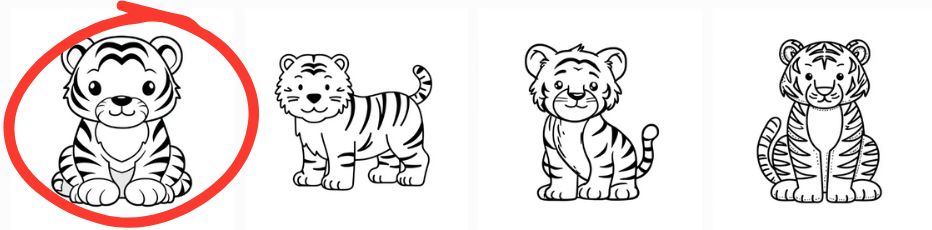
Step 4: Upscale Your Favorite
Click “Upscale” or “Enhance.”
This gives you a high-quality version suitable for printing.
Step 5: Download and Save
Save as PNG or JPG at full resolution.
Example: What Your Final Page Might Look Like
Imagine this:
- A round, cute baby dinosaur
- Big friendly eyes
- Simple spikes on the back
- Thick outline
- Clear white background
Perfect for:
- printable binders
- Etsy listings
- kids’ journals
- birthday packs
- classroom sheets
This is the style we want to replicate in the next two tutorials.
Want a Shortcut? Use the Free ColorGap Kids Creator GPT
Instead of memorizing prompts, you can use the free tool I built specifically for beginners:
Download the Free ColorGap Kids Creator
It gives you:
- Instant coloring page prompts
- Variations
- Matching sets (5 or 10 pages)
- Borders and elements
- Kawaii options
- Simple or detailed versions
- Beginner mode prompts
- “Wow factor” add-ons (for tutorial #2)
It also gently walks you through the process if you’re brand new.
3 Example Prompts You Can Try Today
Prompt #1: Kawaii Bunny
cute kawaii bunny, kids coloring page, thick clean outlines, simple shapes, no shading, black and white line art, white background
Prompt #2: Baby Dragon
adorable baby dragon sitting, kids coloring page, smooth thick outlines, simple details, black and white line art, no color, white background
Prompt #3: Happy Panda
happy panda waving, simple coloring page style, thick cartoon outlines, 2D artwork, black and white, no text, no shading
Try them in any tool, you’ll be amazed at how clean and adorable the results are.
Tips for Better Kid-Friendly Pages
✔ Keep it simple
Kids’ coloring pages work best with 3–5 main shapes.
✔ Avoid tiny details
They don’t print well and aren’t fun to color.
✔ Choose friendly-looking characters
Round shapes = more kid-safe and appealing.
✔ Use thick outlines
This makes it easier for little hands to color inside the lines.
What’s Next?
This is part 1 of a 3-post tutorial series.
Now that you know how to create a cute coloring page, in the next post we’ll talk about:
How to Add a “Wow Factor” to Any Kids’ Printable (Fast!)
You’ll learn:
- borders
- backgrounds
- props
- scene-building
- quick glow-up methods
And yes, the page you just made today will be used again.
Keep your file handy!